Skip to content

Built for biomedical & clinical research

Turn your research data into rigorous, reproducible results

SophanAI helps biomedical and clinical researchers plan, run, and document statistical analyses with transparent, reproducible outputs and no coding required.

Start your analysis

Review the analysis plan before it runs.

StudiesOsteoporosis and 12-month marginal bone loss
SophanAI

I'll guide a fixed, read-only walkthrough of a synthetic dental implant study. No real patient data are present, and no live model or analysis is running in this browser.

I can see 320 rows with one prespecified index implant per participant. Before defining the analysis, shall I inspect the dataset structure, units, ranges, and missingness?
Before & after

Focus on your research.
Not the software.

Move from wrestling with statistical software and formatting results to guided analysis and publication-ready reporting.

Before SophanAI

Spend hours with complex statistical software (SPSS)

  • Struggle to use complex statistical software.
  • You don't know which statistical tests to use.
  • You don't know which assumptions to check for statistical tests.
  • Spend hours formatting output into publication-ready tables and figures.
With SophanAI

Save time with assisted analysis and reporting

  • SophanAI handles all of this for you, so you can focus on your research and not the software.
  • SophanAI provides guidance and runs the statistical analyses for your study based on your data and research questions.
  • SophanAI automatically formats output into publication-ready tables and figures, saving you hours of work.
How it works

From raw data to defensible results.

A clear, guided path through your analysis with a plan you can review and code you can reproduce.

  1. 01

    Upload your data

    Upload your research data in CSV, Excel, and other common formats.

  2. 02

    Describe your study

    Complete a guided interview so SophanAI understands your research questions and data, then review the proposed execution plan.

  3. 03

    Run the analysis

    SophanAI writes and runs the Python code, generating publication-ready tables and figures.

  4. 04

    Export your results

    Download your results in PDF, Word, and other formats for easy sharing and publication.

Built for rigor

Everything your research needs. Nothing it doesn't.

Move from uncertainty and repetitive software work to a guided, transparent analysis workflow you can trust.

Guided statistical reasoning

Turn a research question into a defensible analysis plan through a focused, plain-language interview.

Assumptions, checked

SophanAI identifies and evaluates the assumptions behind every proposed statistical test.

Reproducible by design

Keep the generated Python code, parameters, transformations, and decision trail with every result.

Publication-ready output

Create clean tables, figures, confidence intervals, and effect estimates ready for review.

Transparent interpretation

Understand what each result means, what it does not mean, and how it connects to your hypothesis.

Flexible export

Export your full report to Word or PDF, with code and source data references available when needed.

Security & Privacy

Your data stays yours.
Transparent by design.

SophanAI is built for researchers who handle sensitive study data. Your data is never used to train models, is retained only for a limited period, and you stay in control of deletion at every step.

Read our privacy policy

No training// policy

  • SophanAI does not use your data to train its models — and neither do any of the AI providers on the platform.
  • Your data is only used to run your analysis and generate results.

Retention// limited

  • Providers may retain user data for a limited period (e.g., 30 days) for abuse prevention or law enforcement purposes.

Deletion// in your control

  • Delete your data and analysis results at any time, directly from your account.
  • After a period of inactivity (e.g., 30 days), SophanAI automatically deletes your data.
  • Request deletion at any time by contacting our support team.
Pricing

Professional statistical analysis,
from €19/month.

Basic

€19/month

For students and individual researchers running occasional analyses.

Start your analysis
Features
  • 750 monthly credits
  • ~3–5 analyses per month
  • Standard support
  • Publication-ready figures
  • Secure, isolated analysis environment
  • Excel, CSV & SPSS support

Pro

Popular
€49/month

For active researchers managing multiple studies or iterative analyses.

Start your analysis
Features
  • 2,500 monthly credits
  • ~10–15 analyses per month
  • Priority support
  • Publication-ready figures
  • Secure, isolated analysis environment
  • Excel, CSV & SPSS support

Credits are used per AI message, based on tokens processed and sandbox compute. How do credits work?

FAQ

Questions? We've got answers.

What is SophanAI?

SophanAI is an AI-assisted workspace for statistical analysis, figures, and reproducible research reports.

What kind of analyses can I run?

You can run common analyses including t-tests, ANOVA, regression, survival analysis, mixed models, and more.

Can I use this for publications?

SophanAI can prepare publication-ready figures and methods, but all AI-generated work should receive independent scientific review.

Is my data secure?

Analysis runs in isolated execution environments. Do not upload protected health information or use SophanAI for clinical decision-making.

Who is this for?

It is designed for life-science researchers who want defensible analyses without learning a programming workflow first.

Can I cancel anytime?

Yes. You can manage or cancel your subscription from your account.

How do credits work?

Each AI message in a conversation consumes credits based on the tokens processed and sandbox compute used. A typical analysis runs several messages. Credits reset monthly; unused credits do not roll over.

Stop Waiting Weeks for Statistical Results

Analyze your data and generate publication-ready results today.

Start your analysis
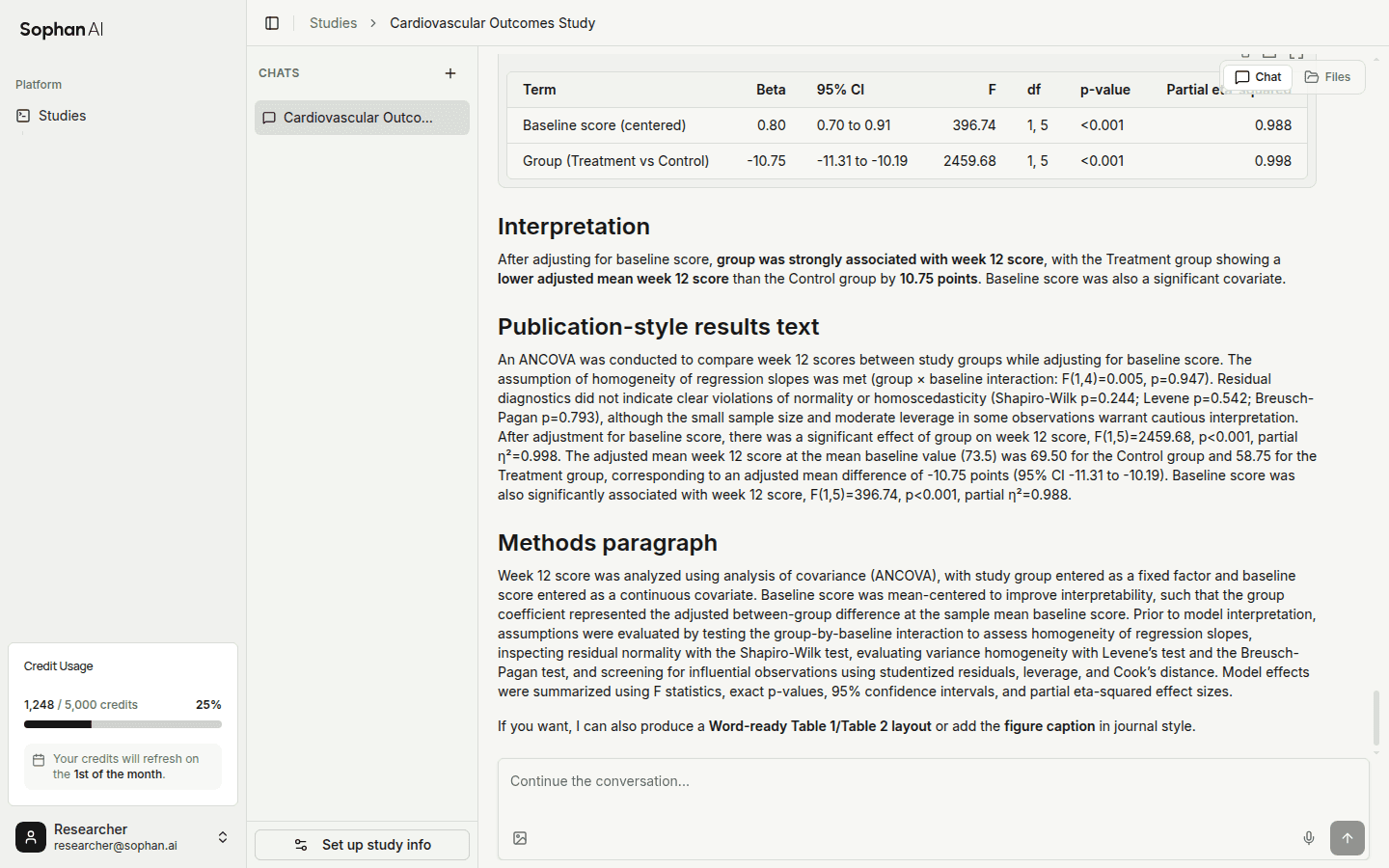
SophanAI statistical analysis workspace showing an ANCOVA results table